
Steam USA $
Price range: ₨ 3,500 through ₨ 32,400
Product Information
Steam Wallet Codes
Steam Wallet Codes offer gamers instant access to thousands of games, from Action to Indie and everything in-between by adding credits to their Steam account and can be easily purchased from our Codes Dukaan store.
With Steam Wallet Codes you no longer need a credit card on Steam to add funds to your Steam Wallet. Steam Wallet Codes work just like a gift certificate, which can be redeemed on the Steam platform for the purchase of games, software, and any other item you can purchase on the Steam Store.
How to redeem a Steam Wallet Code?
Redeem Steam card on your desktop computer:
1. Login to your Steam account.
2. Click your account name in the top right then click Account details.
3. Click Add Funds to your Steam Wallet.
4. Click Redeem a Steam Wallet Code.
5. Enter the code you have received from us via Email.
6. Click Continue.
7. Fund will be added to your Steam Wallet.
Redeem Steam card on your steam client:
1. Launch Steam and login to your account.
2. Go to Games, then click on the “Redeem a Steam Wallet Code” option.
3. Enter the code you have received from us via Email.
4. Click Continue.
5. Fund will be added to your Steam Wallet.
Steam Support
Steam Wallet
Steam Wallet
How do I view my Steam Wallet balance?
Log in to your Steam account. The current available balance will be listed in the upper right-hand corner, next to your profile name.
How do I add funds to my Steam Wallet?
Add funds via Steam
Log in to your Steam account. Click your profile name in the upper right-hand corner and select Account Details. Click on +Add funds to your Steam Wallet to select an amount and proceed to checkout. Funds added to the Steam wallet will be used towards your next purchase(s).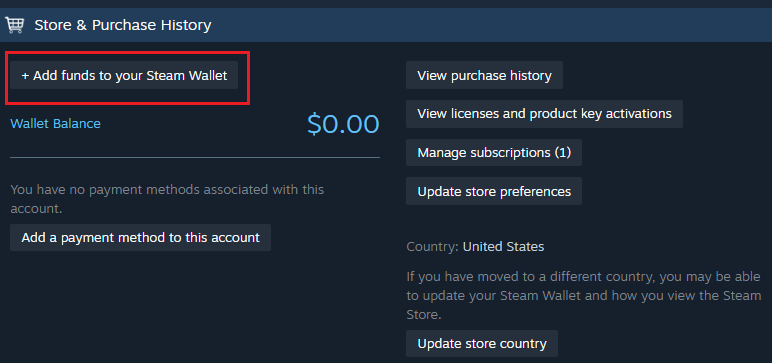
If you do not have sufficient Steam wallet funds to complete the purchase, you will need to enter another form of payment to pay the remaining balance. All available payment methods in your current region are listed during the checkout process.
Add funds via Steam Wallet Codes
Log into your Steam account and then go to the Redeem a Steam Gift Card or Wallet Code page. Type in the code and select Continue.I recently added Steam Wallet funds but they have not appeared, what do I do?
In most cases, the new funds will automatically be displayed in your Steam Wallet balance. If the Steam Wallet balance is incorrect, complete the following steps:
- Check your email for a Steam purchase receipt to confirm the purchase was successfully completed.
- Confirm that you are logged in to the Steam account that made the purchase (the account will be shown on the emailed receipt).
- Restart the Steam Client on your computer.
If the issue persists for more than two hours after completing your purchase, please contact Steam Support for assistance.
Steam Gift Cards and Wallet Codes
How do I add Wallet Codes to my Steam account?
To redeem a Steam Wallet Code on your account, please login to your account and visit Redeem a Steam Gift Card or Wallet Code page. Enter your unique wallet code into the “Steam Wallet Code” field and click “Continue” to add the value to your account’s Steam Wallet balance.
If you have never had a Steam Wallet balance on your Steam account, you may be prompted to enter your current address to determine the correct currency for your Steam Wallet. If you have an existing Steam Wallet (regardless of the current balance), the funds will be added in your Steam Wallet’s current currency.
Once a Steam Wallet Code has been redeemed on an account, the wallet funds are then tied to that account; they cannot be moved or withdrawn to a bank account.
Are there country restrictions on Steam Wallet Codes?
Yes. We have made some changes to how Steam Wallet Codes are redeemed on Steam, as part of our ongoing effort to reduce scams like the ones explained here. These changes should not impact regular customers who enjoy using Steam wallet codes they purchase at retail in their local currency.
Each Steam User Account is associated with a specific currency, which you can see in the top right corner of your Steam Client. Going forward, you may encounter an error if you try to activate a Steam Wallet Code issued in a different currency than the one of your Steam User Account.
If you have questions about your ability to redeem Steam Wallet Codes, please contact Steam Support. If you are concerned about the legitimacy of a Steam code you have purchased, you should ask your retailer.
There was an error redeeming my Steam Wallet Code. What should I do?
If you’re receiving an error redeeming your Wallet Code, please try the below suggestions to ensure that you are entering the correct code. The Wallet Code that you’re entering may be wrong. Please carefully review the characters as you re-enter the code and double-check to see if you’ve mistyped the following keys:
- The number 0, try entering the letter Q, O, or D instead.
- The number 1, try entering the letter I instead)
- The letter O, try entering the number 0, or letters Q or D instead.
- The letter is B, try entering the number 8 instead.
- The letter is G, try entering the number 6 instead.
The Wallet Code wasn’t activated by the retailer. It may take several hours after the time of purchase before the activation is completed by the retailer. If the issue persists after several hours, please contact Steam Support with a clear photo or scan of the entire back side of the Wallet Code and a matching retail receipt.
WARNING! Codes Dukaan is not affiliated, associated, or in any way connected with websites/individuals that promise exchanges and/or trades of any type of products. No assistance will be provided in such cases.